This Blog contains Siva R Vaka's Notes related to latest technology discussions, various algorithms and solutions focusing mainly on AI (Artificial Intelligence) , ML (Machine Learning) & Data Science.
WCM DOJO Event Calendar
Had this as very common requirement (Building WCM Event
Calendar) at most of the clients and we did implemented this in multiple ways
with custom JSP’s and WCM in past.
Recently I came across through the “WCM DOJO Event Calendar”
solution posted on IBM Wiki’s
http://www-10.lotus.com/ldd/portalwiki.nsf/dx/DojoEventCalendar_using_Personalization_Rules
And felt that with few minor tweaks we can use it for the
most of client’s requirements. Installation steps
are already documented in article.
NOTE: As this solution posted based on portal version 6,
this doesn’t work out of the box in portal version 7 and require the
modifications to make it work (Same with sample installers also , these doesn’t
work in the newer versions).
Will post my findings in next article.
Resources
Labels:
WCM,
Websphere Portal,
WP8
Database table sequence generation and retrieval in MySQL & DB2
To insert a record in to database table “A” (where auto
generated sequence number is primary key) and retrieve that sequence no and
insert a record into table B ( where foreign key is referring to table “A”
primary key) .
Ex:
CREATE TABLE A (
priColumn
INT NOT NULL,
genColumn
VARCHAR(20),
PRIMARY KEY(priColumn)
);
CREATE TABLE B (
priColumn
INT NOT NULL,
genColumn
VARCHAR(30),
FOREIGN KEY (priColumn) REFERENCES
A(priColumn)
);
To handle this
scenario in MySQL
1.
To generate the sequence number in MySQL , you no
need to execute separate DDL’s like “create sequence” ..etc, instead you can
use “AUTO_INCREMENT” on table ddl
CREATE
TABLE A (
priColumn INT NOT NULL AUTO_INCREMENT,
genColumn VARCHAR(20),
PRIMARY KEY(priColumn)
);
2.
Every time you insert record into table A,
priColumn is filled automatically.
3.
Use the following select statement to retrieve
sequence number (Auto Increment) value generated after insert statement .
SELECT
LAST_INSERT_ID()
To handle this
scenario in DB2
1.
There are different ways you can generate the
unique values in the DB2.
a.
Using “generate_unique()” function
INSERT INTO A VALUES (GENERATE_UNIQUE(),
'general column1')
b.
Using Identity column
CREATE TABLE A (
priColumn
INT NOT NULL GENERATED ALWAYS AS IDENTITY
(START WITH 1, INCREMENT BY 1, NO
CACHE),
genColumn
VARCHAR(20),
CONSTRAINT
X_priColumn PRIMARY KEY(priColumn)
);
You can
simply insert row like and generates unique value in the “priColumn”
INSERT INTO A VALUES (‘general column1');
2.
To retrieve the value inserted in using identity
column, DB2 has function called IDENTITY_VAL_LOCAL , it retrieves the last
inserted sequence id.
You
can now retrieve the last inserted value in table A and put in table B ,
INSERT INTO B
VALUES (identity_val_local(), ‘general column1');
Resources
Configuring SpringIDE plug-in in RAD 8.0
As part of spring portlet development on RAD 8.0, configured
Spring IDE plugins to RAD 8.0 .
NOTE: As RAD8.0 is based on Eclipse 3.6, suggest to install
the Spring IDE for the eclipse 3.6 .
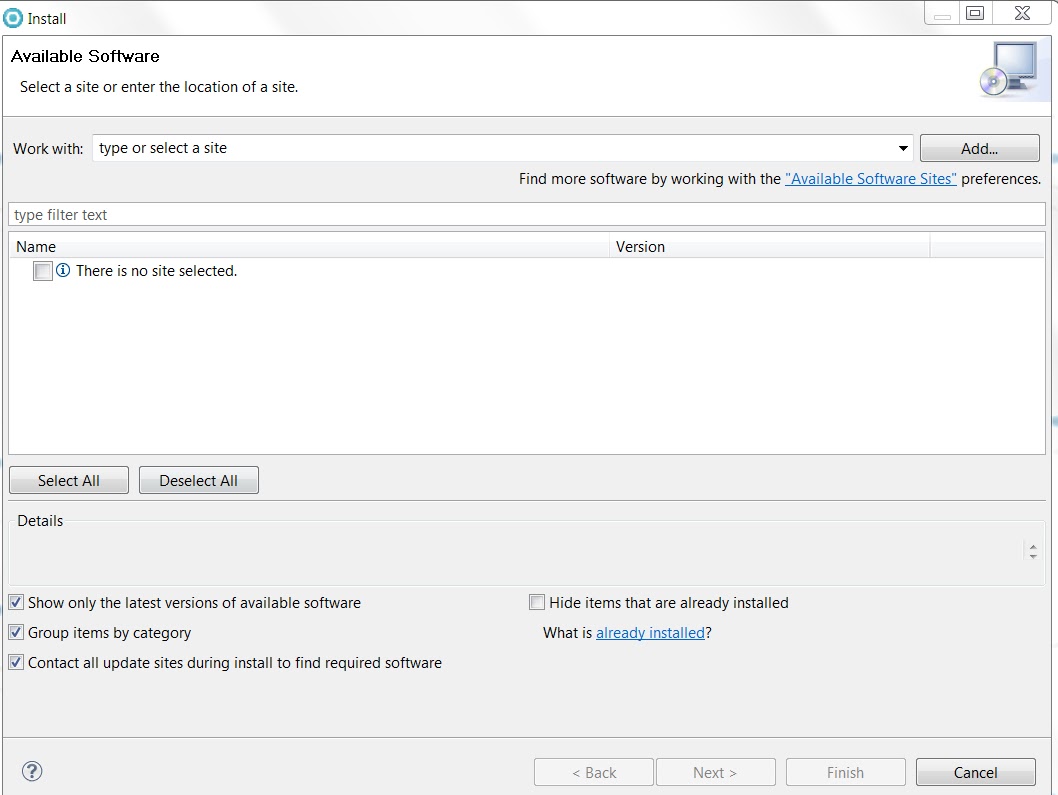
1.
Import the following bookmarks URL in RAD
install new software
either you can download the xml file and import or you can point URL
directly by clicking “add”
From RAD --> Window --> preferences --> install/Update --> Available Software
Or
From RAD --> Help --> Install New
Software -->add
2.
Have selected the following modules ( if we
choose something doesn’t support then dependencies will not let you install)
3.
Either you can accept or reject that consent for
the anonymous data
4.
Once plugin installation is successful, it restarts
the workbench and displays spring source dashboard.
Resources
Labels:
Websphere Portal
Creating MySQL datasource on Websphere Application Server
1. Create the J2C Authentication alias
with MySQL username and password
2. Creating JDBC provider,
a. choose the following values
Database type : user-defined
Implementation class name :
com.mysql.jdbc.jdbc2.optional.MysqlConnectionPoolDataSource
b. In next step provide MySQL JDBC
driver jar file ( While installing the MySQL community server , make sure to
install java connector (connector J))
c. Click finish
3. Once JDBC provider is created , you
can create the new datasource under that JDBC provider
a. Enter datasource name
b. Enter data store helper class name
Data store helper class
name :: com.ibm.websphere.rsadapter.GenericDataStoreHelper
c. Select the container-managed
authentication alias and choose the J2C authentication alias that’s created at
starting.
d. Once Datasource created, need to
adjust the following custom properties
Update the following five custom properties
databaseName :test
user :root
password :Passw0rd
port :3306
serverName :sivapc.sivavaka.com
Labels:
DataBase
MySQL Workbench
Along with installation of the MySQL community server ,
MySQL workbench also got installed and it found it much useful to administer
the DB , data modeling and also for the development purposes (DDL’s , DML’s)
Easy to start/stop the MySQL
server now from server administration
By default there are few schemas and tables has already
created as part of the installation
Labels:
DataBase
MySQL Installation
As part of testing spring portlet application locally, I had to install MySQL in my local workstation
and captured the following details while installation.
1.
Download MySQL community server for your
operating system ( these screens are captured based on Windows 7 64-bit )
2.
Click on “download” to download “mysql-installer-community-5.5.29.0”
(this version is when I downloaded)
3.
Once download is finished , Run installer.
4.
Choose installation type “Full”
It asked me to install the Visual Studio 2010 tools for office runtime.
5.
I have chosen “Development Machine” option and default
TCP/IP enabled
6.
Specify the MySQL Root password
7.
And I have added admin user (in addition to root,
this step is not mandatory)
8.
Select to “run as the windows service”
9.
Specify log file location
Labels:
DataBase
Subscribe to:
Posts (Atom)